Vertex Density Paint
Paints a per-vertex density weight directly onto the Loaded Mesh only — it has no effect on the Generated Mesh, since density has to be marked before retopology runs, not after. Left mouse paints, right mouse erases. The cursor itself shows both rings: the outer ring is the brush radius, the inner ring the falloff boundary, and the center cross grows with strength.
Brush controls
Brush radius in screen pixels (1–500, a logarithmic slider) — the brush stays the same size on screen as you zoom or orbit. Brush falloff (0–1, 0 is a hard-edged disc, 1 a soft ramp across the whole radius), and Brush strength (0.1–5.0). Painting replaces the touched area's weight rather than accumulating it, so changing the strength slider only affects future strokes, never what's already painted. Shift+Wheel, Ctrl+Wheel and Alt+Wheel adjust radius, falloff and strength live, as do the Grow/Shrink Brush Radius (]/[), Falloff (Alt+]/[) and Strength (Ctrl+]/[) shortcuts. Clear Paint resets every painted vertex back to zero.
The strength gradient
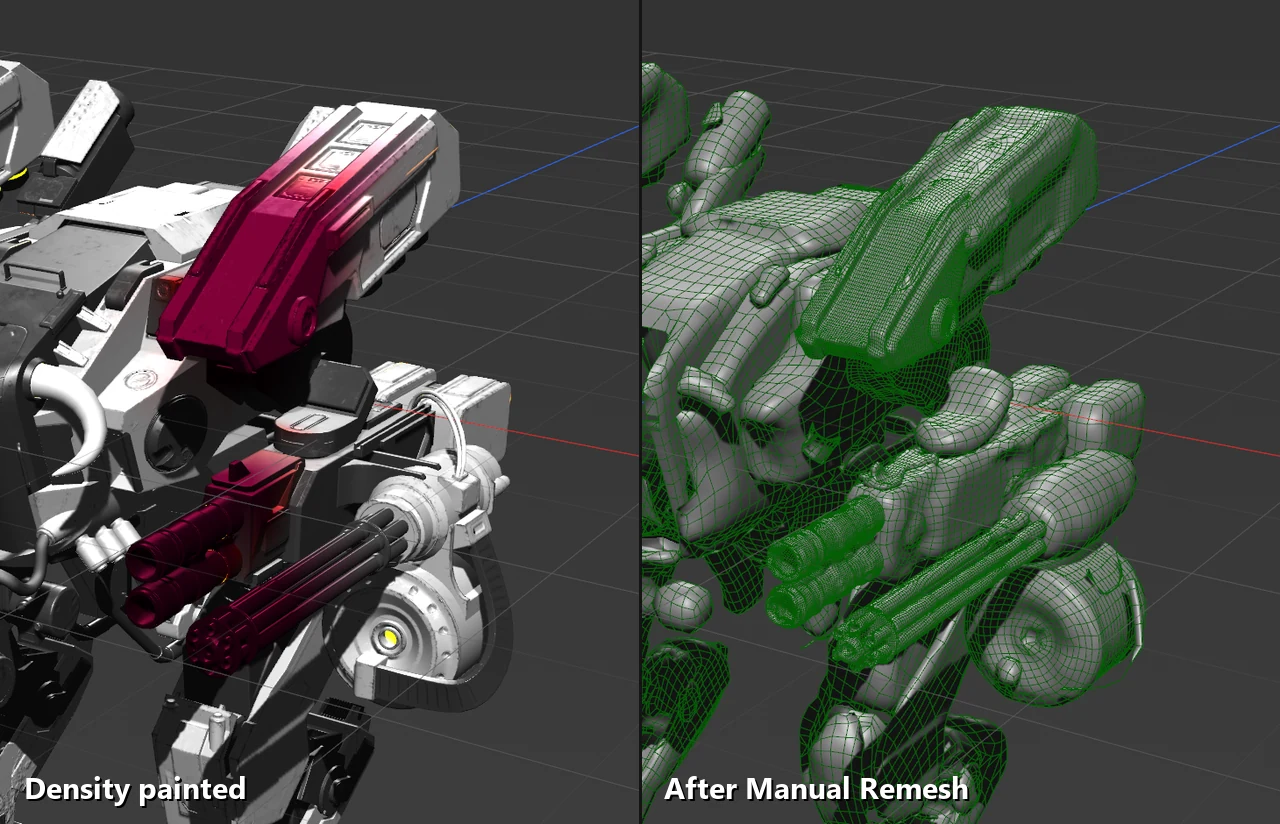
Painted strength is visualized directly on the model as a color ramp: white at 0, through red around the middle, to purple at maximum strength 5. The same gradient function colors both the strength bar in this window and the paint overlay on the mesh itself, so what you see on the model always matches what the bar shows for that value.
How this feeds Manual Remesh
Before a Manual Remesh run, painted weights are smoothed across the mesh so a single dab doesn't create a sharper density jump than the solver can resolve cleanly. The result multiplies directly into each vertex's target edge length — a vertex painted at maximum strength ends up roughly five times as dense locally (in the figure, strength 4 made the painted quads' edges about a quarter as long). The local change needs room to grow into: on a shape whose grid wraps all the way round with no poles — a plain torus, say — the extra quads spread around the whole ring instead of gathering where you painted. Painted regions add quads beyond whatever Target quad count is set to, rather than stealing density from the rest of the mesh's budget, and a painted run is excluded from the app's usual target-count self-calibration so the extra painted quads don't get mistaken for overshoot on your next, unpainted run.